Shopify Sales Tax in the USA (2025): Setup, Nexus & Compliance Guide
Sales tax is a critical part of running an eCommerce business in the United States. For Shopify merchants, managing sales tax can seem complicated, but understanding the rules and leveraging Shopify’s tools can simplify the process.
Shopify Tax helps merchants automatically calculate U.S. sales tax, but sellers must still remit payments themselves.
Nexus laws determine tax obligations; physical presence or economic thresholds require merchants to collect state sales taxes.
Configuring Shopify sales tax includes setting regions, overrides, exemptions, and testing orders to ensure accuracy at checkout.
Easyship integrates with Shopify to automate tax, duties, and shipping calculations for domestic and international compliance.
Staying updated on state tax rules and documenting configurations prevents penalties, audits, and costly compliance errors.
Shopify sales tax was enacted in January 2025 to automatically collect ,remit and file taxes for all orders that are shipping to or within the United States. This might be a tad tricky for the Shopify user / business owner which may lead to surprises at the final checkout and customer dissatisfaction.
This guide breaks down the essentials of Shopify sales tax in the USA, and how to set it up, helping you navigate compliance confidently.
What Is Shopify Sales Tax?
Sales tax is a fee charged on the sale of goods or services and collected by businesses on behalf of state and local governments. Shopify helps merchants calculate and collect sales tax from customers based on the rules you configure in your Shopify admin.
For eCommerce businesses, compliance is key. Failure to collect or remit the correct amount of sales tax can result in penalties, audits, and back taxes. Since tax laws vary by state, it’s essential to understand how they apply to your business.
Understanding Nexus: Physical vs. Economic
Nexus is the legal connection between your business and a state that determines whether you must collect sales tax there. There are two main types of nexus:
A Physical Nexus occurs if you are located in the state Physical nexus is determined by whether or not your business has a tangible presence in a state. This includes having an office, warehouse, or inventory stored in a 3PL provider like Easyship’s eCommerce fulfillment center.
An Economic Nexus can apply if you are a remote seller Economic nexus is based on the amount of business you do in a state. Many states have thresholds, such as $100,000 in sales or 200 transactions annually, which, if exceeded, require you to collect sales tax.
Configuring Sales Tax in Shopify
Setting up sales tax in Shopify is straightforward. Follow these steps to ensure you’re collecting the correct tax rates for your eCommerce store:
Step 1: Access the Taxes Section in Shopify
Log in to your Shopify admin account.
Navigate to Settings in the bottom-left corner of the dashboard.
Select Taxes and Duties from the list of settings options.
Step 2: Set Up Your Tax Regions
Click on United States under the “Taxes and duties” section (or another country if applicable).
In the Tax regions section, click Set up or Add tax rate for a specific state.
Shopify may automatically suggest tax rates based on the state’s rules. Review these rates to ensure they are correct.
You can also use Easyship’s plugin to calculate tax and duties for international shipping, ensuring that you stay compliant.
Step 3: Add Tax Rates for Your Store
If prompted, select the state or country where you need to collect taxes.
Enter the tax rate specific to that region, as required by state or local law.
Save your changes to apply the new tax rates.
Step 4: Configure Tax Overrides or Exemptions
Return to the Taxes and Duties page in your admin panel.
Under the region or product section, look for Tax overrides and exemptions.
Add exemptions for:
Specific products: For instance, groceries, which may be tax-exempt in certain states.
Customer groups: Such as tax-exempt organizations or wholesale buyers.
Step 5: Enable Shopify Tax for Automated Calculations
In the Taxes and Duties section, activate Shopify Tax if available.
Shopify Tax automatically calculates taxes based on:
The customer’s location.
The product type.
This tool also provides liability insights, making it easier to determine where and how much tax you need to collect.
Step 6: Test Your Tax Settings
Place a test order from your Shopify store.
Enter a shipping address in a state or country where tax is required.
Confirm that the correct tax rate is applied at checkout.
Step 7: Consider Third-Party Tax Integrations
If your store operates in multiple states or countries, third-party tax services can streamline compliance.
Popular options include Easyship, which integrates with Shopify to:
Periodically review your tax settings to ensure compliance with changes in tax laws.
Use Shopify’s Manage Tax Liability page to track your sales thresholds in each state.
Pro Tip: Document Your Tax Configuration
Keep a record of the tax rates, exemptions, and overrides you configure.
Save confirmations and receipts for tax filings to maintain accurate compliance records.
By following these steps, you’ll ensure your Shopify store is properly configured to collect and manage sales taxes efficiently, helping you stay compliant and focus on growing your business.
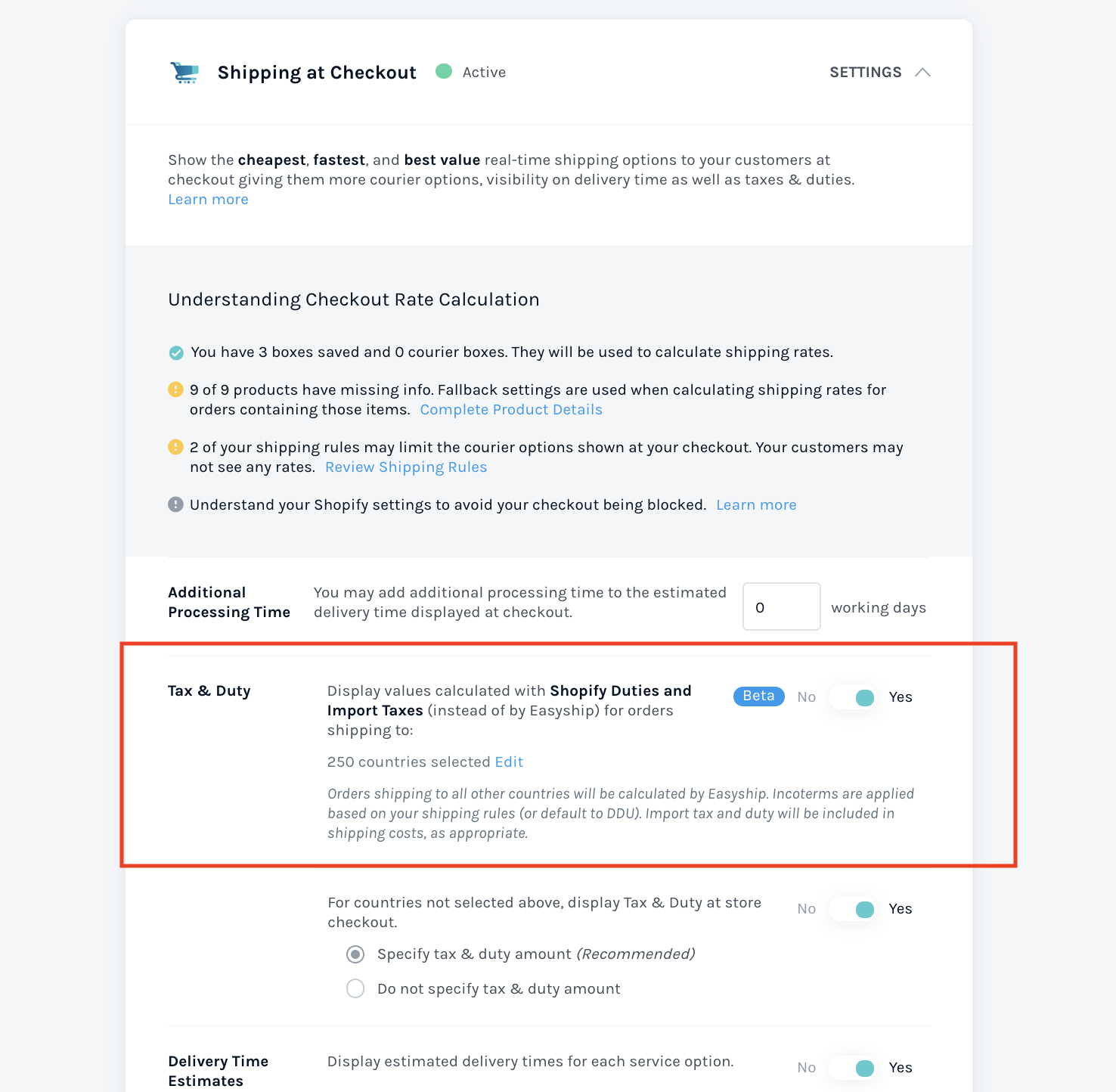
On your store page, in the Checkout settings, you will find a setting that indicates to Easyship that you are using the Shopify Duties and Taxes, and for which destination countries you wish to apply it to.
Just switch the toggle to yes and you can easily ensure that you are getting the latest tax numbers on your shipment!
Before you set up taxes in Shopify
Before you configure Shopify sales tax, it is crucial to determine if you should charge taxes. If unsure then consult your local tax authorities and or professional to determine the need to tax your products.
Moreover, it is also important that you set up your Shopify tax in the regions you are based or operate out of. How to do that? Follow these steps:
From your Shopify account, go to Settings and then select Taxes and duties.
In the Manage sales tax collection section, click your region.
Click on Collect Sales Tax.
In the Tax number, enter your tax number. If you have applied for a tax number, but don't have one yet, then leave this field blank.
Click Collect tax.
Determining Your Tax Liabilities
Shopify helps merchants track where they may owe sales tax through the “Manage Tax Liability” page in the Shopify admin. This tool identifies states where you’ve reached the economic nexus threshold or have a physical presence.
Key considerations include:
Tax liabilities are calculated based on net sales (total sales minus refunds, shipping costs, and tax and duties paid). A dedicated shipping tool like Easyship can make it easier to separate how much you’ve spent on shipping.
Sales thresholds vary by state and can be calculated using different time periods, such as the previous calendar year or over a rolling 12-month period.
Only sales made through Shopify or imported into Shopify are tracked for tax liabilities. Easyship makes it easy to track all your shipments, no matter which sales channel or eCommerce platform you use.
For sellers with significant sales volumes or multiple sales channels, consider using specialized tax software or consulting a tax professional to ensure compliance. You can also consider and compare multiple couriers and better to find the one best suited to your budget and delivery needs.
How to Register for Sales Tax in the USA
To collect sales tax in a state, you first need to register with that state’s tax authority. Each state has its own process, but the general steps are:
Determine Your Nexus Confirm whether you have physical or economic nexus in a state. Use Shopify’s tracking tools or consult sales reports.
Visit the State Tax Authority Website Each state’s tax authority website will outline the registration process. You’ll need your business details, such as your legal business name, DBA (if applicable), and business location.
Submit the Required Forms Many states offer online registration, but some require paper forms or additional verification steps, such as notarized documents.
Receive Your Sales Tax Certificate Once approved, the state will issue a sales tax certificate, which allows you to legally collect and remit sales tax.
Collecting and Remitting Sales Taxes Through Shopify
Shopify makes collecting sales taxes easy. Once you configure tax settings in your Shopify admin, sales tax is automatically calculated and added to customer transactions at checkout. However, Shopify does not remit taxes to states for you—this is the merchant’s responsibility.
To remit sales taxes:
Check your state’s remittance schedule. Some states require monthly payments, while others accept quarterly or annual filings.
File your sales tax returns and submit your sales tax payment and corresponding return to the state’s tax authority, often through their online portal.
Keep records of all tax filings and payments for audit purposes.
Using automation tools, like those offered by Easyship, can help streamline the remittance process as your business grows.
Managing Sales Tax Exemptions and Exceptions
Handling sales tax exemptions and exceptions is straightforward with Shopify. In the “Taxes” section of your Shopify admin, you can create exemptions for specific products, customer groups, or shipping addresses. This is particularly useful for tax-exempt customers, such as non-profit organizations or government agencies.
You can further set up exceptions for specific tax rates or jurisdictions, ensuring compliance with varying tax regulations. Shopify Tax provides valuable insights and reports to help you track and manage these exemptions and exceptions effectively. Regularly reviewing and updating your sales tax exemptions and exceptions is crucial to maintaining accuracy and compliance.
Additionally, you can also use resources provided by third-party platforms like Easyship, where you can simplify your shipping taxes and duties. Whether you’re shipping domestic or international, you can stay compliant with all the tax regulations through Easyship’s tax and duties calculator.
Tax Sourcing Rules: Origin vs. Destination States
Sales tax rules in the USA are based on where the sale takes place, known as tax sourcing. There are two primary methods:
Destination States In most states, sales tax is based on the customer’s location. For example, if you ship a product to a buyer in New York, you apply New York’s tax rate.
Origin States In a few states, sales tax is based on the seller’s location. For instance, a Texas-based merchant selling to a Texas customer applies the tax rate of their business location.
Hybrid states like California combine both methods, using origin-based rates within the state and destination-based rates for sales across county lines.
Notice and Report States: Use Tax Obligations
In states with notice and report laws, businesses without nexus must notify customers of their obligation to pay use tax. These laws ensure customers pay taxes on purchases made from out-of-state sellers.
If you sell to customers in notice and report states:
Add a notice at checkout informing customers about use tax requirements.
Send an annual report to customers and state tax authorities if required.
Common Sales Tax Challenges
One of the most common challenges merchants face is manually updating sales tax information. This process can be time-consuming and prone to errors, especially as tax regulations and rates frequently change. Navigating these complex tax laws can be overwhelming for business owners.
Shopify Tax addresses these challenges by providing automated calculations and liability insights. With Shopify Tax, you can put your sales tax returns on autopilot, saving countless hours and reducing the risk of errors. This automation allows you to focus on other aspects of your business without sweating your sales tax obligations.
Additionally, Shopify Tax offers a wealth of resources and support to help you navigate common sales tax challenges. By leveraging these tools, you can streamline your sales tax compliance and concentrate on growing your business.
Shopify Sales Tax Resources and Support
Shopify offers a comprehensive range of sales tax resources and support to help you stay compliant. The Shopify Tax guide provides detailed information on setting up and managing sales tax within Shopify. Additionally, Shopify hosts sales tax webinars and workshops to keep you informed about the latest tax regulations and best practices.
The Shopify community forum is an excellent resource for connecting with other merchants and getting answers to your sales tax questions. For more personalized assistance, Shopify support is available 24/7 to help with any sales tax-related issues or concerns.
Using Shopify Tax gives you access to a variety of sales tax resources and support, including tax information saving us countless hours and reducing the risk of errors. With Shopify Tax, you can collect sales taxes with ease and focus on what you do best—growing your business.
Ensure Price Transparency with Easyship’s Tax and Duties Feature!
In addition to configuring your Shopify sales tax for you, Easyship can also help you directly calculate your taxes for international orders. You can easily estimate your tax and duties when shipping from US or to US from different international locations, based on your shipment value and product type.
USA Shopify Sales Tax FAQs
Note - this is for US Only. Other Countries you will need to check with your national/local taxing authorities.
1. Do I need to collect sales tax for my Shopify store?
Yes, you must collect sales tax for customers in states where you have a physical presence (e.g., home office, warehouse, or store). This is known as a "tax nexus." Most products and services are liable to sales tax but some are exempt or subject to a different amount; this depends on your state.
2. How do I get a sales tax certificate?
Apply for a sales tax license through your state’s Department of Revenue or Secretary of State website. Some states allow online applications, while others may require notarized forms to be mailed. Always keep the certificate for your records, especially if you sell in-person.
3. How often do I remit sales taxes?
This depends on your state. Some require monthly filings, while others mandate quarterly or annual submissions. Details will be provided when you receive your sales tax certificate.
4. What happens if I don’t remit sales taxes?
States can impose penalties, late fees, and estimate your owed taxes based on similar businesses. These estimates may be much higher than your actual sales, so always file and pay on time.
5. Do I need a corporation or LLC to get a sales tax certificate?
No, sole proprietors can get a sales tax certificate. However, some states may require a DBA (Doing Business As) registration if you operate under a business name.
6. What is a nexus threshold, and does it apply to me?
A nexus threshold is the annual sales amount (dollar value or transaction count) at which you must start collecting sales tax in a state where you have no physical presence. Each state has its own threshold (e.g., $100,000 or 200 transactions). Shopify can track and configure taxes automatically for states where you reach the threshold.
7. Does Shopify remit sales taxes to the states for me?
No. Shopify collects sales tax on your behalf during checkout but includes it in your payouts. It is your responsibility to remit these taxes to the relevant states.
8. Do I need an EIN to sell on Shopify?
Sole proprietors don’t need an EIN and can use their Social Security Number for tax purposes. However, an EIN is required for LLCs, corporations, and some wholesale supplier accounts. You can apply for an EIN for free through the IRS website.
9. What if I make sales outside of Shopify?
If you sell through other platforms or in person, you need to track those sales alongside Shopify’s to ensure accurate tax collection and remittance. An accountant or sales tax software can help manage this process.
TABLE OF CONTENTS
Key points
Key Points:
Shopify Tax helps merchants automatically calculate U.S. sales tax, but sellers must still remit payments themselves.
Nexus laws determine tax obligations; physical presence or economic thresholds require merchants to collect state sales taxes.
Configuring Shopify sales tax includes setting regions, overrides, exemptions, and testing orders to ensure accuracy at checkout.
Easyship integrates with Shopify to automate tax, duties, and shipping calculations for domestic and international compliance.
Staying updated on state tax rules and documenting configurations prevents penalties, audits, and costly compliance errors.
Get Your Ship Together.
By submitting the form, you agree to receive marketing emails from Easyship.
Save up to 91% on Shipping. Try for free.
Effortlessly compare 550+ courier services with one global account. Instant discounts. Start in minutes.
Shipping Internationally? Unsure What Tariffs or Duties Apply?
Try our FREE Tax & Duty Calculator
Trying to stay up to date on the latest cross-border shipping and import requirements? Get an instant estimate of all applicable taxes and duties for every country across 220+ global destinations or sign up and take advantage of our in-built HS Code lookup tool.
Looking for the cheapest way to ship a package? Get an instant shipping quote and compare rates from 550+ courier services across the United States, Canada, UK, Australia, and more. Simply add your package size and delivery location, and you'll find the best deal in seconds.
Find the guaranteed cheapest rates for any courier in seconds with Easyship’s free shipping rate calculator. Compare discount rates from USPS, UPS, FedEx, and 250+ couriers at a glance.
Find the guaranteed cheapest rates for any courier in seconds with Easyship’s free shipping rate calculator. Compare discount rates from USPS, UPS, FedEx, and 250+ couriers at a glance.
Receive a personal cost estimate for your crowdfunding campaign from our trusted global fulfillment partners. Easyship is a certified Indiegogo partner.
Get instant access with volume-discounted shipping rates. Save up to 89% off on USPS, UPS, FedEx, and more. Easyship is free for 50 shipments each month.
Find your perfect fulfillment partner with expert help
Let Easyship connect you to the largest shipping and fulfillment network on Earth. You’ll find trusted partners for all things logistics. Guidance is free from our global shipping experts.
Explore the powerful features that 100K+ merchants use to ship smarter, not harder. Shipping automation, live rates at checkout, live duty and tax – all free to try with Easyship.
With 550+ pre-negotiated shipping services available with discounts of up to 91%, you can save time & money today when you integrate your Shopify store with Easyship
Easyship is free to use for 50 shipments every month. You’ll save big on our discounted shipping rates up to 91% off, and save time with smart automation. Signup is fast and free.
Follow the easy path to fulfillment success. Easyship’s free fulfillment checklist provides a proven step-by-step so you can ship at scale without the guesswork.
Save up to 89% off all shipping rates. Easyship offers the guaranteed cheapest volume-discounted rates on the market from USPS, UPS, FedEx, and 250+ global couriers.
Don’t miss all our money and time-saving features!
Explore the innovative features that 100K+ merchants use to ship smarter, not harder. Shipping automation, live rates at checkout, live duty and tax – all free to try with Easyship.
What exactly does it cost to ship cross-border? Use the free duty and tax calculator from Easyship to view accurate import costs for any shipment to anywhere.
Discover the Cheapest Shipping from USPS, UPS & FedEx
Find the guaranteed cheapest rates for any courier in seconds with Easyship’s free shipping rate calculator. Compare discount rates from USPS, UPS, FedEx, and 550+ courier services at a glance.
Find the guaranteed cheapest shipping in seconds with Easyship’s free shipping rate calculator. Compare discounted rates from USPS, UPS, FedEx, and 250+ global couriers at a glance.
Save up to 91% off shipping with Easyship’s discount courier rates. Create your free account to save instantly on 550+ courier services, including USPS.
Discover the Cheapest Shipping from USPS, UPS® & FedEx
Find the guaranteed cheapest rates for any courier in seconds with Easyship’s free shipping rate calculator. Compare discount rates from USPS, UPS, FedEx, and 250+ couriers at a glance.
Use Easyship’s free shipping policy generator to formulate your perfect holiday shipping policy for returns, tracking, and more. Just follow the prompts and you’re done!
Learn how to ship internationally without missing a step. Our case studies show you proven tactics for shipping worldwide from Easyship users who did it right.
.svg)
.svg)






.svg)





.svg)
.svg)
.svg)

.svg)
.svg)