Easyship Now Shows Shopify's Ship By and Deliver By Dates for Merchants
When Shopify tells a buyer their order will arrive by a specific date, that promise needs to hold. Easyship now makes it possible to fulfill Shop Promise orders without accidentally selecting a courier that breaks it.
Shopify's Ship By and Deliver By dates now appear directly in Easyship's courier selection flow
Couriers that can't meet the Deliver By window are flagged with a "Doesn't meet Shopify commitment" warning
A toggle lets you filter the courier list to only show options that meet the Shopify Delivery Commitment
Shop Promise orders always carry these dates, but non-Shop Promise orders can too, provided, you've configured delivery date estimates in your Shopify settings
No separate tool or manual lookup needed, the dates and filtering are built into the shipment creation screen
Shopify sends Ship By and Deliver By dates for orders where it has made a delivery commitment to the buyer.
Easyship now reads those dates, surfaces them at the point of courier selection, flags couriers that fall outside the window, and gives you a one-click toggle to filter your options down to only those that can meet the commitment.
The result is fewer errors, less manual research, and better alignment between what your buyers were promised and how you fulfill. This is also helpful for the eligible Shopify merchants who are keen to retain their Shop Promise badge.
What Are Shopify's Ship By and Deliver By Dates?
When Shopify calculates a delivery commitment for an order, it produces two dates based on your fulfillment history and carrier transit times:
Ship By date: The latest date you need to hand the package to a carrier to meet the delivery window
Deliver By date: The date range Shopify has promised the buyer their order will arrive
Important Note: These dates are set by Shopify, not estimated by Easyship. They represent the actual commitment Shopify has made to your buyer and displayed at checkout.
Missing the Ship By date typically means the order won't arrive within the Deliver By window, which may lead to customer dissatisfaction or in case of Shop Promise, trigger badge performance reviews.
Where Do These Dates Appear in Easyship?
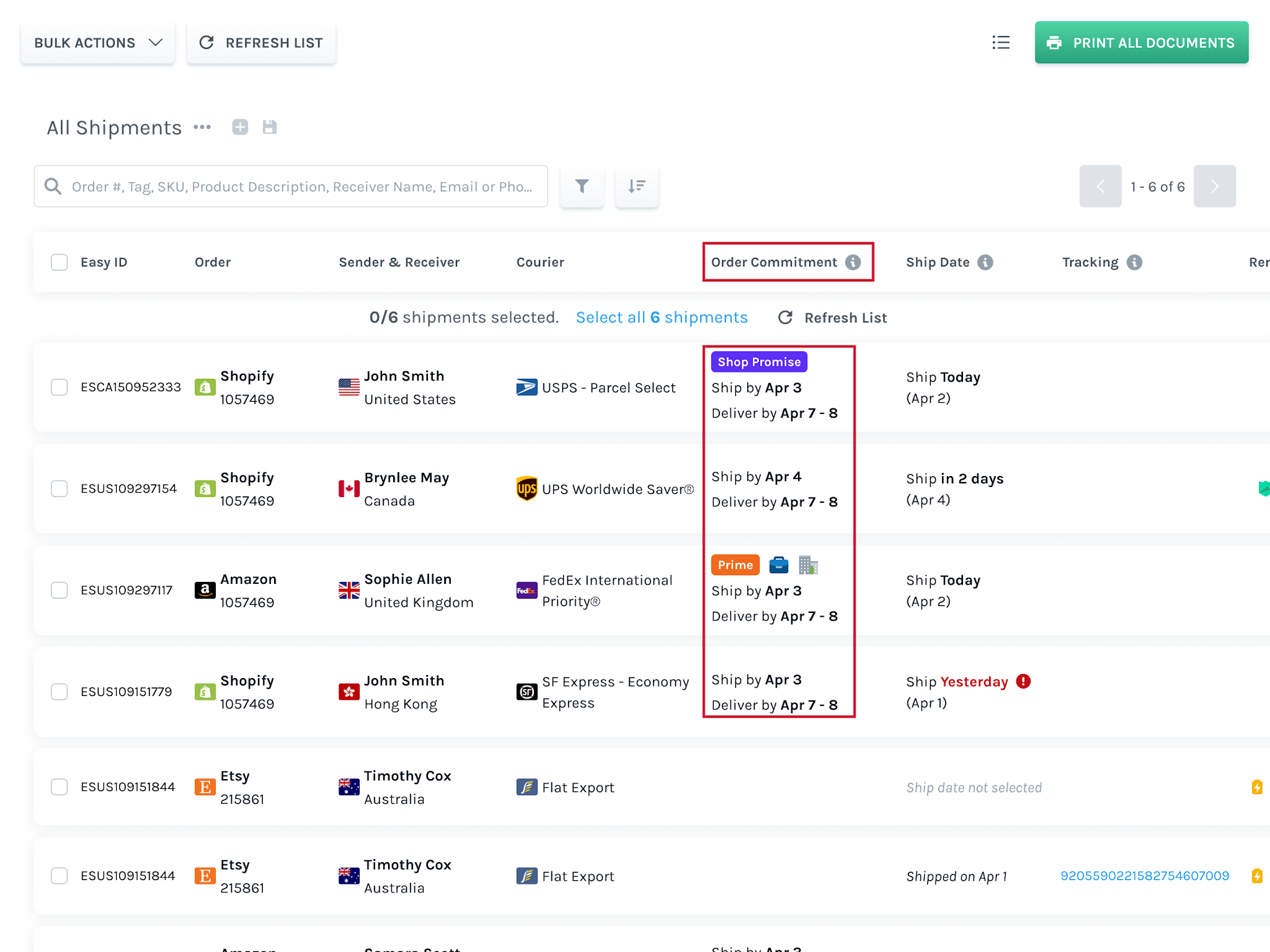
Interestingly, these dates appear on the Easyship dashboard when you’re creating a shipment. Whether it's a single order or multiple orders in one fulfillment, you receive a clear order commitment date.
Another advantage is that whether its a Shop Promise order or a regular shopify order, (even an Amazon Prime Shipping order, if you’re using it), you get the order commitment dates that clearly highlight the ship by and deliver by dates clearly so that you can retain your shop promise badge / keep your customers informed about their shipment’s arrival date.
What Does "Doesn't Meet Shopify Commitment" Mean?
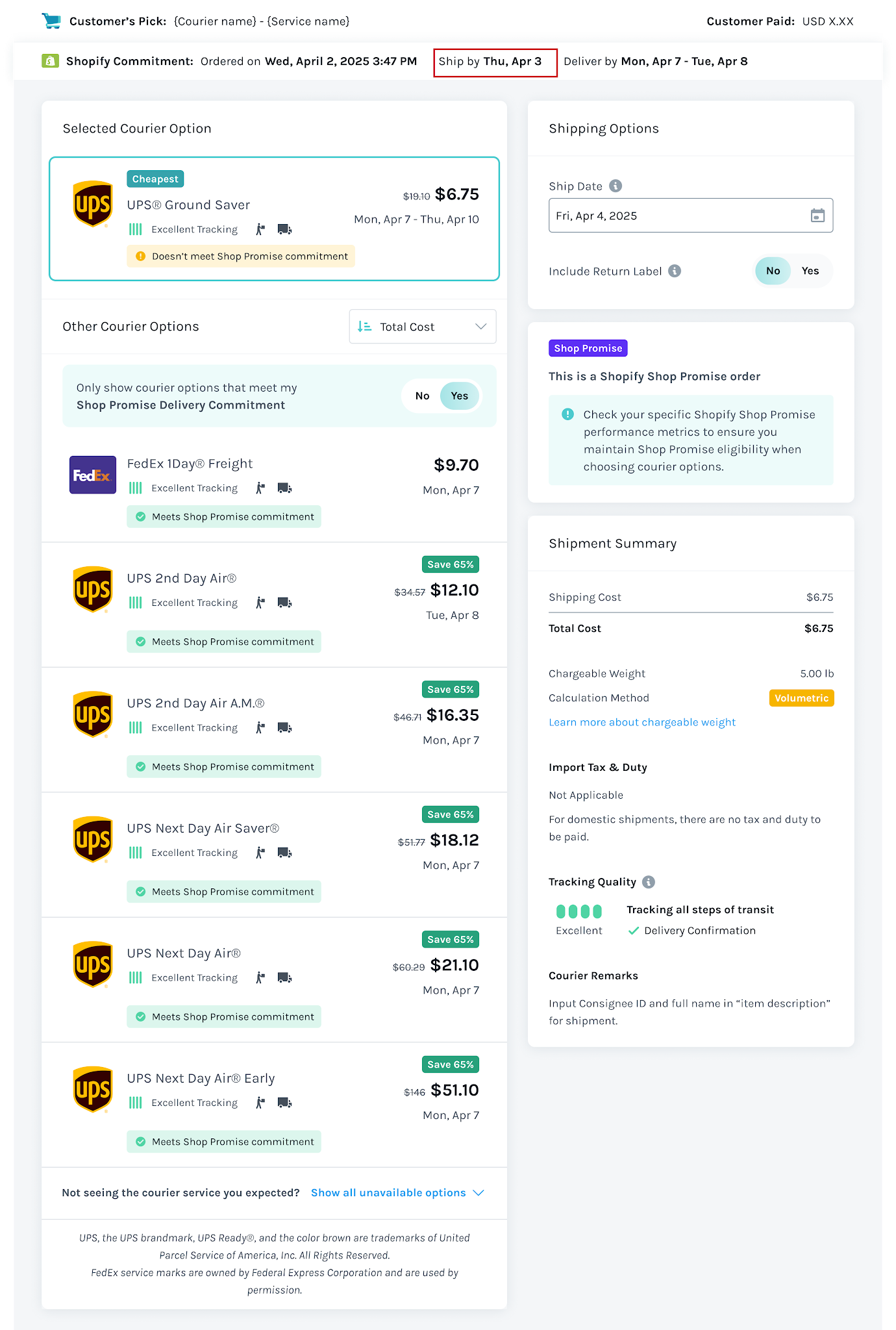
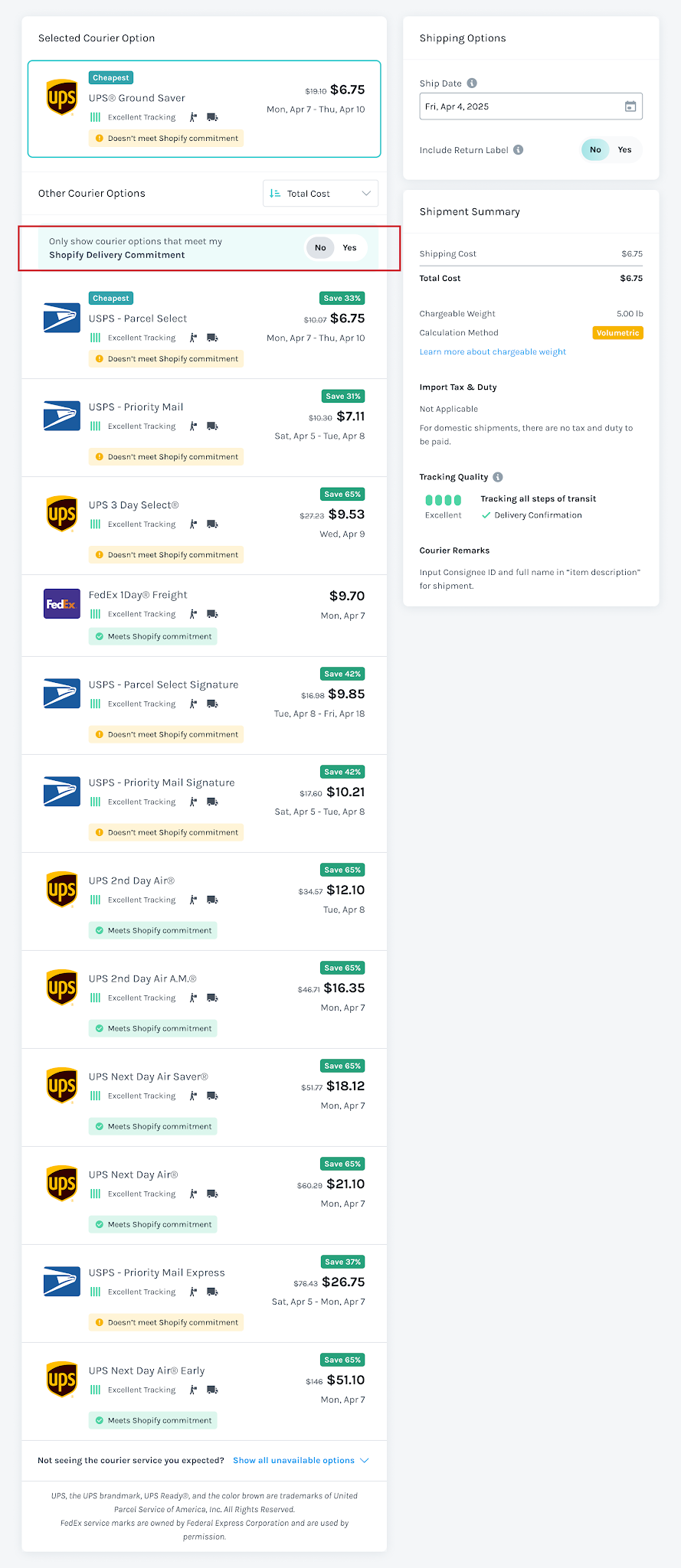
Each courier option in Easyship is evaluated against the Deliver By window for that order. If a courier's estimated transit time falls outside that window, you'll see a warning label directly on that option: "Doesn't meet Shopify commitment" or “Doesn’t meet Shop Promise Commitment” in case of a Shop Promise order.
Similarly, if it falls within the transit time, the courier will display "Meets Shopify commitment" or “Meets Shop Promise Commitment” in case of a Shop Promise order.
This matters because the cheapest option isn't always the compliant one.
A courier might be significantly cheaper but deliver 2–3 days later than the committed date. With it, you can see the conflict immediately and decide accordingly, before the shipment is created.
Meets / Doesn’t Meet Shop Promise Commitment
Meets or Doesn’t Meet Shopify Commitment
How Do You Filter by Shopify Delivery Commitment?
Below the courier list, there's a toggle: "Only show courier options that meet my Shopify Delivery Commitment.". A similar toggle appears for Shop Promise orders.
Switch it to Yes and Easyship removes non-compliant couriers from view entirely.
You're left with only the options that can be fulfilled within the delivery window which makes the selection process faster and removes the risk of accidentally choosing one that doesn't qualify.
In case you're processing at volume, Easyship's Shipping Rules let you automate compliant courier selection entirely.
Why Does This Matter for Shop Promise Merchants?
For merchants in Shopify's Shop Promise program, this update is especially relevant. Shop Promise eligibility is evaluated continuously based on on-time delivery performance; if orders consistently miss the Deliver By window, the badge gets paused.
The challenge is that missed windows often aren't intentional. They happen because a courier was selected without visibility into the commitment Shopify had already made to the buyer. Surfacing the Ship By and Deliver By dates directly in the courier flow removes that blind spot.
You can enable Shop Promise, you can also stick to your delivery commitments all without leaving your Easyship dashboard, while getting the best courier pick of the lot! Integrating your Shopify store with Easyship is easy and you can do it in a couple of clicks!
The Ship By date is the latest date you need to dispatch an order to a carrier for it to arrive within Shopify's promised Deliver By window. Shopify calculates it based on your fulfillment history and carrier transit times. Missing it typically means the order arrives late.
What is the Deliver By date in Shopify?
The Deliver By date is the delivery window Shopify has promised to the buyer at checkout. It appears on product pages, at checkout, and in the Shop app. For Shop Promise orders, it's backed by Shopify's trust badge. (Source: Shopify)
Do Ship By and Deliver By dates only apply to Shop Promise orders?
No. All Shop Promise orders carry these dates, but non-Shop Promise orders can too — if you've configured delivery date estimates in your Shopify store settings. Whenever Shopify sends these dates, Easyship surfaces them and filters couriers accordingly.
Where do I see Ship By and Deliver By dates in Easyship?
They appear in a Order Commitment row at the top of the courier section when you open an order that has Shopify delivery dates. The Ship By date is highlighted, and the Deliver By range sits next to it, both visible before you select a courier.
What happens if I select a courier that doesn't meet the commitment?
Easyship flags it with a "Doesn't meet Shopify commitment" warning on that courier option. You can still select it, but the warning makes the risk visible before you confirm.
Can I filter couriers to only show Shopify compliant options?
Yes. There's a toggle, "Only show courier options that meet my Shopify Delivery Commitment" that filters out non-compliant couriers when switched to Yes.
Does Easyship set these dates, or does Shopify?
Shopify sets them. Easyship reads the dates from Shopify and surfaces them in the fulfillment flow, it doesn't modify or estimate them independently.
TABLE OF CONTENTS
Key points
Key Points:
Shopify's Ship By and Deliver By dates now appear directly in Easyship's courier selection flow
Couriers that can't meet the Deliver By window are flagged with a "Doesn't meet Shopify commitment" warning
A toggle lets you filter the courier list to only show options that meet the Shopify Delivery Commitment
Shop Promise orders always carry these dates, but non-Shop Promise orders can too, provided, you've configured delivery date estimates in your Shopify settings
No separate tool or manual lookup needed, the dates and filtering are built into the shipment creation screen
Get Your Ship Together.
By submitting the form, you agree to receive marketing emails from Easyship.
Save up to 91% on Shipping. Try for free.
Effortlessly compare 550+ courier services with one global account. Instant discounts. Start in minutes.
.svg)
.svg)





.svg)





.svg)
.svg)
.svg)

.svg)
.svg)